
GitLab runners on your own Hetzner Cloud account
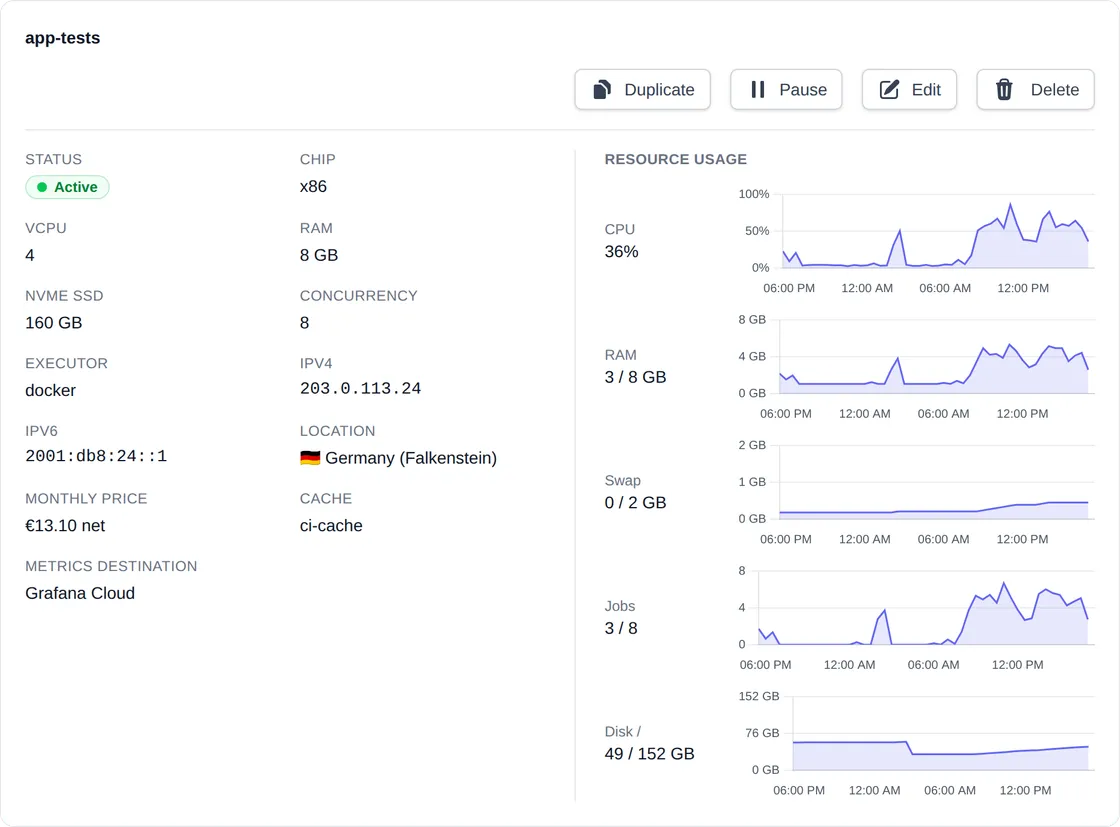
Runners are servers in your Hetzner project, registered with GitLab.com or self-managed GitLab. Create, duplicate, pause and autoscale them from the dashboard, CLI or AI assistant. Track CPU, RAM, swap, disk and running jobs in the dashboard and, optionally, your own OpenTelemetry backend.
From $5.99/month for unlimited runners, plus the Hetzner servers, which Hetzner bills to you directly.
How it fits together
Manage Runners sets up and looks after GitLab runners in your Hetzner Cloud project. Your CI jobs run between your GitLab and your own server.
Your GitLab
GitLab.com or self-managed. Holds your code and pipelines and hands jobs to the runner.
Registers as a runner and fetches jobs
Server in your Hetzner project
Debian 13 with Docker and GitLab Runner. Runs your CI jobs. Hetzner bills you for it directly.
Creates, pauses and resumes it with your Hetzner API token
Manage Runners
Dashboard, CLI and MCP server. Configures the server, schedules it and shows its status.
One runner is one Hetzner server running GitLab Runner
- Executor
- Docker, Docker-in-Docker or Shell. With Docker, each job runs in its own container.
- Concurrency
- How many jobs it runs at once. The dashboard sets it to twice the server's vCPU count; you can change it.
- Capacity
- On Pro and Enterprise, autoscaling adds burst runners to a busy GitLab runner within minutes and drains them when the load falls. Hetzner bills them by the started hour; the runner itself always runs. You can also duplicate runners, and pause or schedule them to stop paying for idle hours.
-
Your jobs never pass through us
GitLab Runner on your server fetches jobs from your GitLab and runs them there. Code, job logs and CI/CD variables stay between GitLab and your server.
-
Only what your Hetzner token allows
Manage Runners creates, pauses, resumes and deletes runner servers and their IP addresses through the Hetzner Cloud API. It creates no firewalls, networks, volumes or SSH keys.
-
No SSH access for us
Only the SSH keys you select from your Hetzner project are installed. After setup, the server contacts Manage Runners only to report metrics, if you turn them on.
What you can do with it
Create a runner from one form
Enter a GitLab runner token and a Hetzner API token, pick a server type and location, and the server installs Docker and GitLab Runner and registers with GitLab within a few minutes. No SSH session or config files.
Duplicate for more capacity
Copy a runner with its configuration and GitLab runner token. The copy gets its own server and IP addresses and takes jobs alongside the original. On Pro and Enterprise, autoscaling adds burst runners to a busy GitLab runner for you.
Pause and schedule
Pausing deletes the server and keeps the runner's settings, so Hetzner stops billing for the server, though it may still charge for the kept IP addresses. Running jobs can finish first, for up to an hour. Schedules pause and resume runners on a weekly timetable; set them with the CLI, the API or your AI assistant, not yet in the dashboard. Schedules need the Pro or Enterprise plan.
Fixed IP addresses
Each runner keeps its IPv4 and IPv6 addresses across pause and resume, so allow lists and firewall rules on your GitLab or deployment targets keep working.
Automatic updates
Servers install Debian, Docker and GitLab Runner package updates on their own and reboot when an update needs it. Docker stays on major version 29. A resumed runner starts on a freshly installed server.
Metrics, in the dashboard or yours
See each runner's CPU, RAM, swap and disk usage and running jobs in the dashboard, or have the runner push them over OpenTelemetry to your own monitoring, such as Grafana Cloud or OpenObserve.
3 steps to your first runner
If you already have Hetzner Cloud and GitLab accounts, the quick start takes you from sign-up to your first CI job in about 15 minutes, including creating the two tokens.
Create two tokens
Create a runner in GitLab and copy its runner authentication token, then create an API token with Read & Write access in your Hetzner Cloud project.
Configure your runner
Pick a server type, location, executor and concurrency. Optionally select SSH keys from your Hetzner project and add labels that a Hetzner firewall can apply to.
Run your jobs
The server installs Docker and GitLab Runner and registers with your GitLab within a few minutes. Jobs with the runner's tags, or untagged jobs if you allow them, then run on it.
Manage runners from your AI assistant
Manage Runners is a remote MCP server for Claude, Claude Code and other clients that support Streamable HTTP and MCP authorization. Sign in with your account and choose what your assistant may do.
- Reads your runners, metrics, schedules, scaling policies and Hetzner prices.
- Previews creating, resuming, duplicating or replacing a server for you to confirm.
- Secrets never pass through the AI: you enter tokens in the dashboard.
Connector URL
https://api.managerunners.com/mcpClaude Code
claude mcp add --transport http manage-runners https://api.managerunners.com/mcpFrequently Asked Questions
What does it cost in total?
Two bills. Manage Runners charges your organization's plan: Basic is $5.99/month for unlimited runners, and Pro at $19.90/month adds schedules and autoscaling. Hetzner bills your Hetzner account directly for each runner's server, by the hour up to a monthly price; see Hetzner's pricing. A paused runner has no server, but Hetzner may still charge for its kept IP addresses. See our pricing.
Why my own Hetzner servers instead of GitLab's hosted runners?
GitLab's hosted runners use compute minutes (see GitLab's pricing), while Hetzner bills a server by the hour up to a monthly price, however many jobs it runs. Which is cheaper depends on how much CI you run and how many hours your runners are active; see the GitLab CI cost comparison. On your own server, Docker images and the local CI cache can be reused between jobs, subject to automatic cleanup, and are lost when the server is recreated. You also choose the server type, location and firewall rules.
How much can I save compared with GitLab's hosted runners?
It depends on how many minutes you use. Beyond what your plan's included compute minutes cover, GitLab.com bills $10.00 per 1,000 job minutes on the small Linux runner and up to $120.00 on 2xlarge. A Hetzner server costs the same however many jobs it runs. For example, at prices as of 19 October 2026, the cheapest server matching the small runner, CX33 in Germany/Finland, costs $10.59 a month including IPv4, plus $5.99 for the Basic plan. Always on, that is cheaper than hosted minutes from about 1,658 small-runner job minutes a month beyond those the quota covers; below that, hosted runners cost less. Compare your own usage with the calculator.
Does it autoscale?
Yes, for GitLab runners on the Pro and Enterprise plans. Autoscaling adds burst runners, extra Hetzner servers, when few of a runner's job slots are free, and drains them when the load falls. It reacts within a few minutes, not seconds, and never stops the runner you set it up on. Hetzner bills each burst runner by the started hour, including time spent draining. See Autoscaling. To stop paying for idle hours, pause runners by hand or with a schedule (Pro and Enterprise plans).
How many jobs can a runner run at once?
As many as its concurrency, GitLab Runner's global concurrent setting. Choosing a server type in the dashboard sets it to twice the server's vCPU count; lower it for memory-hungry jobs. Changing it recreates the server. See Concurrency.
If I pause a runner, will it still cost me anything?
Pausing deletes the runner's Hetzner server and keeps its configuration and its IPv4 and IPv6 addresses. You can let running jobs finish first: the runner takes no new jobs, and the server is deleted once they are done, at the latest after an hour, so Hetzner bills it until then. After that, Hetzner stops billing for the server but may still charge for the kept IP addresses; see Hetzner's pricing. Resuming creates a fresh server with the same addresses.
What happens to my runners if I cancel my plan?
Cancelling doesn't delete your runners' servers: they stay in your Hetzner project, and Hetzner keeps billing them. Burst runners added by autoscaling are the exception: once the plan ends, none are added, and existing ones start draining in the last 15 minutes of a paid hour and get up to one hour to finish running jobs before they are deleted. Enabled schedules keep pausing runners at their stop times, which deletes the server, but scheduled starts stop without an active plan. To keep a runner running on its own, delete its schedule before the plan ends; schedules can't be changed afterwards. To stop Hetzner's charges, delete the runners with the CLI or API, which deletes their servers and IP addresses.
What happens if Manage Runners is down?
Active runners keep running jobs: GitLab Runner on your server takes jobs from your GitLab, not from us. Until Manage Runners is back, the dashboard, CLI and MCP server are unavailable, schedules don't pause or resume runners, autoscaling adds and removes no burst runners, and the dashboard records no metrics. Metrics your runners send to your own OpenTelemetry endpoint keep going.
Can I put my runners behind a Hetzner firewall?
Yes. Manage Runners creates no firewalls, but the labels you give a runner become Hetzner server labels, so a firewall that applies to a label selector covers your runners. GitLab Runner only makes outgoing connections, so you can block all incoming traffic, apart from SSH if you log in. Outgoing, the server needs your GitLab, the Debian, Docker and GitLab Runner package repositories for setup and automatic updates, Manage Runners during setup and for metrics, your OpenTelemetry endpoint if you send metrics there, and whatever your jobs reach. See Labels and firewalls.
Will you SSH into my servers?
No. Only the SSH keys you select from your Hetzner project are added, for root, and password login is disabled. Manage Runners adds no keys of its own.
What does my runner send to Manage Runners?
During setup, the server reports when it starts configuring and when GitLab Runner is registered, so the dashboard can show its state. After that it contacts Manage Runners only for metrics, if you turn them on: about once a minute its CPU, RAM, swap and disk usage and number of running jobs for the dashboard, or, if it only sends metrics to your own endpoint, the result of its last export. Your jobs, code, logs and CI/CD variables are never sent.
Which Hetzner server types are supported?
Every Hetzner Cloud server type that Hetzner has not deprecated and offers in at least one location, with x86 (Intel or AMD) or ARM CPUs. Hetzner's locations are Falkenstein, Nuremberg, Helsinki, Singapore, Ashburn and Hillsboro; not every type is offered everywhere, and the dashboard shows where each one is available and at what price.
Does it work with my self-managed GitLab instance?
Yes, with GitLab.com and self-managed GitLab. Create a runner in GitLab to get its runner authentication token (glrt-…) and enter your instance's URL. The instance must be reachable from the runner's IP addresses, which stay the same when you pause and resume, so you can allow them in your firewall. See GitLab setup.
Who is behind Manage Runners, and where is my data stored?
Manage Runners is run by Detech Digital Co., Ltd. in Hanoi, Vietnam (legal notice). According to the privacy policy, your data is hosted by Hetzner Online GmbH in data centers in Germany, administrators in Vietnam may access it for support and service delivery under Standard Contractual Clauses, and Cloudflare protects and delivers the website. Payments go through Dodo Payments. Your CI jobs, code and logs stay between your GitLab and your server.
Run your CI on your own Hetzner servers
Plans start at $5.99/month for unlimited runners. Hetzner bills the servers to your own account.