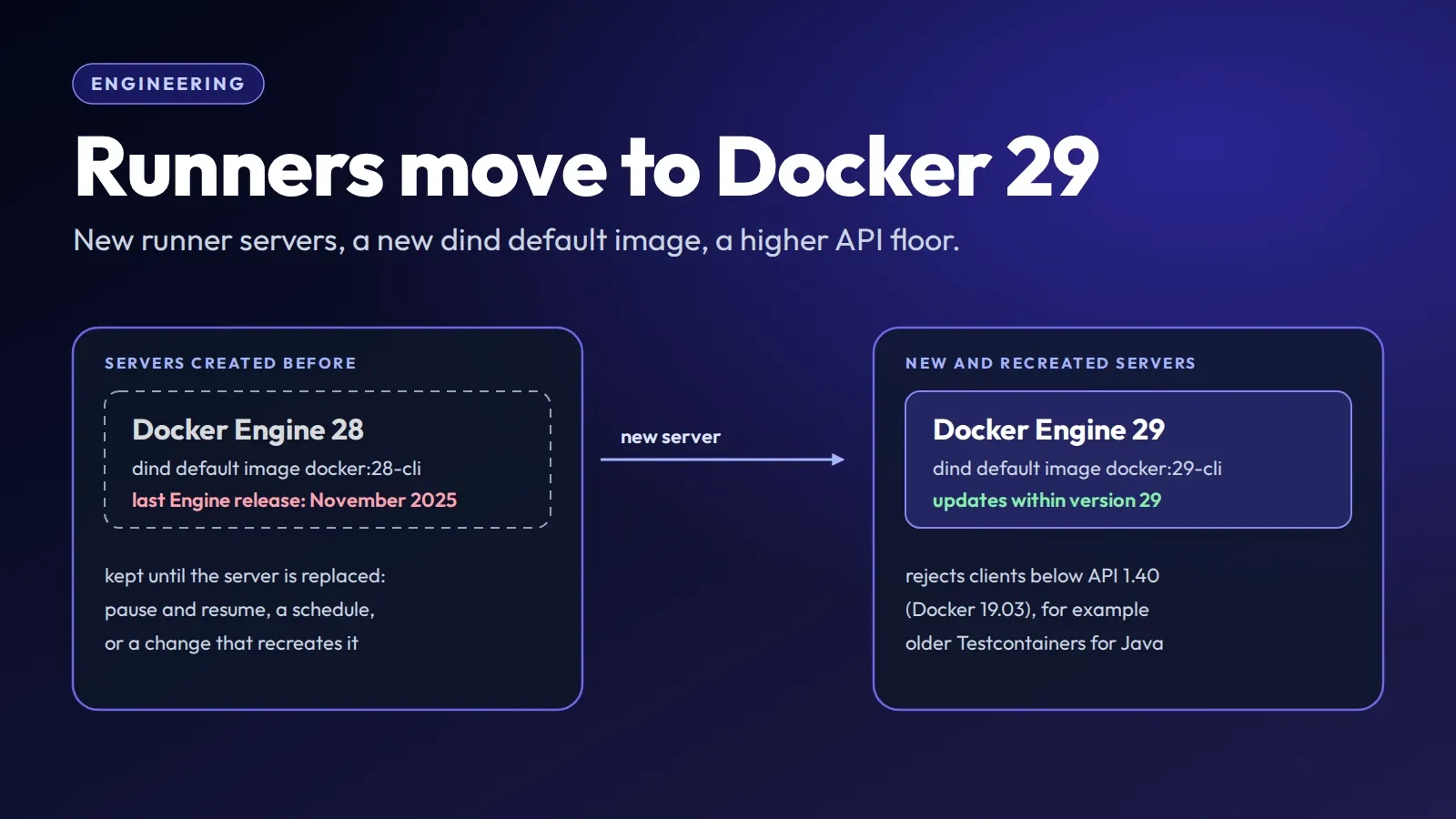
Manage Runners now installs Docker Engine 29 on new runner servers, and the dind executor’s default job image is now docker:29-cli instead of docker:28-cli.
The reason is maintenance. Docker 28 has had no new Engine release since 28.5.2 on 5 November 2025; recent Engine fixes, including security fixes in many releases, are shipping in 29.x. A runner that runs your code with access to a Docker daemon should be on the release line that gets them.
Most jobs should keep working. This post focuses on one compatibility change worth checking: jobs that talk to the Docker daemon with a client that sends an old API version. Docker 29 also includes other changes; see other changes in Docker 29 below.
What changes
On a server created from now on:
- Docker Engine 29 is installed on the server from Docker’s official package repository. Automatic updates keep it on the latest 29.x release; moving to a future Docker major version will be a deliberate change on our side, not an unattended upgrade.
- The
dindexecutor’s default image isdocker:29-cli. It applies to jobs that don’t set animage:. Withdind, jobs use the server’s own Docker daemon through its mounted socket (see executors), so the Docker version on the server is the one yourdocker buildtalks to.
The docker and shell executors are unchanged apart from the server’s Docker Engine: docker still defaults to alpine:latest, and shell jobs use the Docker CLI installed on the server, which is now 29 as well.
Which runners get it, and when
The Docker major version is set when a server is created. Existing servers are not changed in place. A runner gets Docker 29 the next time Manage Runners creates a server for it:
- a new runner, including a duplicated one,
- a resume after a pause, by hand or by a schedule: pausing deletes the server, and resuming creates a new one,
- a recreate, when you change a setting that recreates the server, such as the executor, the concurrency or the cache.
A server created before this change stays on the Docker 28 release line until one of those happens, and on a dind runner it keeps the docker:28-cli default image. A runner that pauses every night on a schedule is on Docker 29 after its next scheduled resume. A runner that has been active for months stays on Docker 28 until you pause and resume it. We recommend that you test your pipelines on a new or duplicated runner first, then pause and resume the others while they are idle.
Old API clients
Every Docker client sends the Docker Engine API version it speaks, and the daemon refuses clients that are too old. Docker 29.0 raised that minimum to API 1.44 (Docker 25), which broke tools that still sent older versions. Docker 29.3.0 lowered it again (moby/moby#52067), so the current 29.x release has a minimum supported API version of 1.40 (Docker 19.03, from 2019).
A client below that gets an error like this:
Error response from daemon: client version 1.32 is too old. Minimum supported API version is 1.40, please upgrade your client to a newer versionThe docker CLI negotiates the highest version both sides support, so the CLI version decides. We tried CLIs against a Docker 29 daemon: 28.5.2, 20.10 and 19.03 work; 18.09, which speaks API 1.39, gets the error above.
What can hit it:
- A very old
dockerimage pinned inimage:, such asdocker:18.09. - A library or SDK that sends a fixed API version below 1.40 instead of negotiating one.
- Testcontainers for Java before 1.21.4, and 2.0.0 to 2.0.1. 1.21.3, 2.0.0 and 2.0.1 default to API 1.32 through docker-java, and older releases also default to an API version below the minimum, so they can’t find a valid Docker environment on Docker 29. 2.0.2 sets the default to 1.44 (#11216), and 1.21.4 does the same with a fallback to 1.32 for older engines.
If you can’t upgrade Testcontainers yet, set docker-java’s API version yourself: put api.version=1.44 in src/test/resources/docker-java.properties, so it is on the test classpath, or pass -Dapi.version=1.44 to the JVM that runs your tests.
A pinned Docker 28 CLI is not affected. If you set image: docker:28-cli to keep the CLI you know, it keeps working against the Docker 29 daemon, because it speaks API 1.51.
How to check
On a dind runner, add a job, or a line to an existing one, that prints both sides:
docker-version:
  image: docker:29-cli # or the image your jobs use
  tags: [your-dind-runner-tag]
  script:
    - docker version
Client shows the API version your CLI speaks. Server shows the Engine version and its API version with the minimum it accepts: on a runner with a new server, 29.x and 1.40.
On a shell runner, run docker version directly in the job; image: doesn’t apply there. A job on a plain docker runner has no Docker daemon unless the job configures one, so the check fails there for that reason alone.
For libraries, check their version against the list above or their own release notes, and look for an API version that is set explicitly: DOCKER_API_VERSION in your CI variables, api.version in docker-java configuration, or a fixed version in an SDK’s client constructor. Remove an old value, or raise it to at least 1.40.
If your jobs start their own daemon with a docker:dind service and point DOCKER_HOST at it, that daemon’s version comes from the service image you choose, not from the server.
What to do
- Upgrade Testcontainers for Java to 2.0.2 or later, or 1.21.4 or later on 1.x.
- Replace
dockerimages older than 19.03 inimage:, and old client libraries that pin an API version below 1.40. - Duplicate a runner or create a new one, run your pipelines on it, then pause and resume the others.
We won’t offer Docker 28 on new servers: it has had no Engine release since November 2025, and an old API client is fixed on the client side.
Other changes in Docker 29
This post isn’t a full migration guide. The Docker 29.0 release notes list the other breaking changes and deprecations. Two that can matter in CI jobs:
- Docker Content Trust was removed from the Docker CLI. Jobs that sign or verify images with
docker trustand a 29 CLI need another tool, or the separately built plugin the release notes point to. - The containerd image store is the default on fresh installs, and every new runner server is a fresh install. Most jobs won’t notice; if yours depend on how images and layers are stored, for example on
docker imageoutput or sizes, check them on a new server.
If something breaks that this post doesn’t explain, start with the troubleshooting page and the executors section.