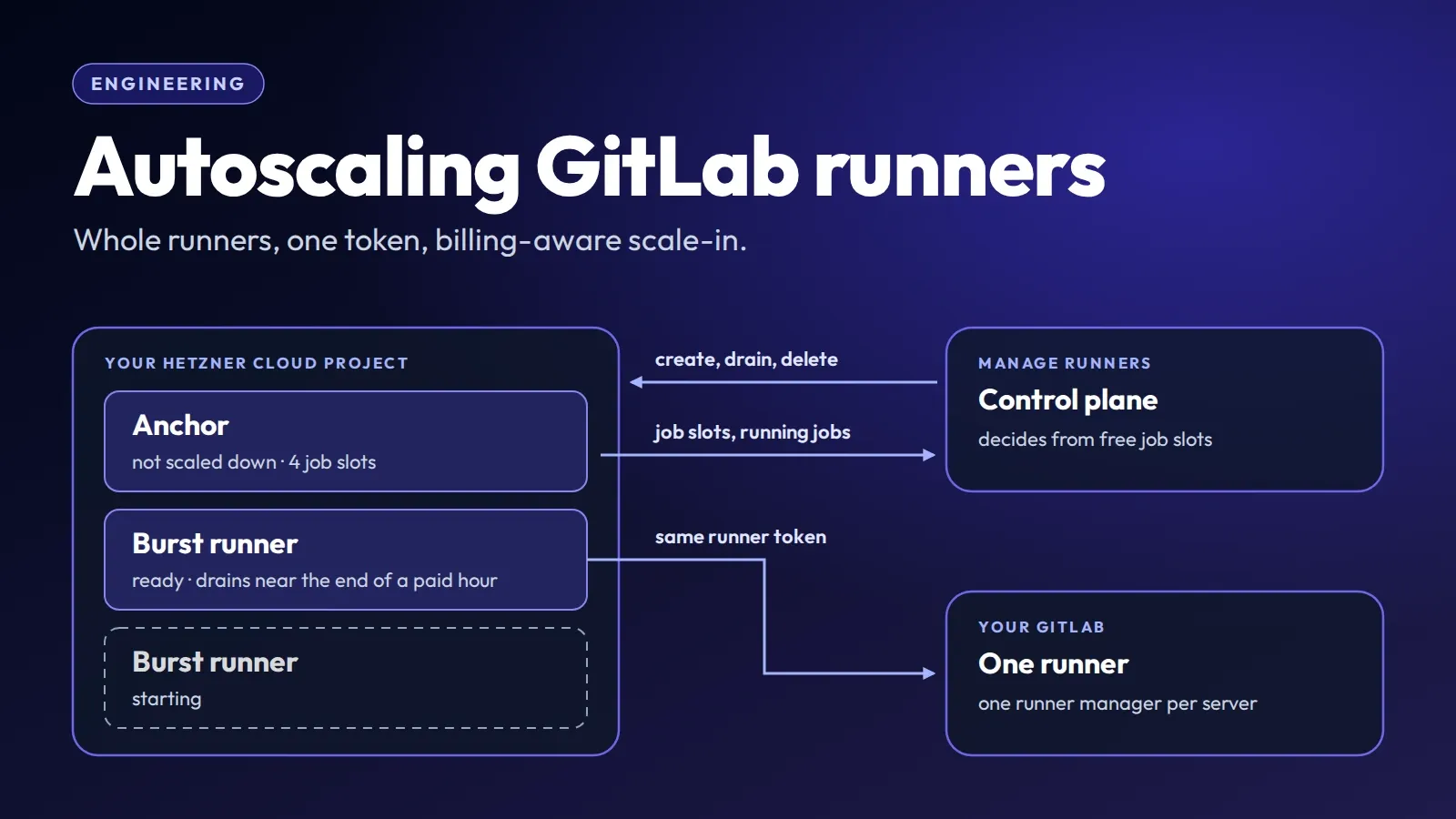
In How Manage Runners works, every runner is one server with a fixed number of job slots. When all of them are busy, jobs wait in GitLab. Autoscaling changes that for GitLab runners: while a runner’s job slots stay full, Manage Runners adds more servers to it, and once the load fits on fewer, it removes them again.
This article explains how that works. The idea: add whole runners that share one GitLab runner, decide from the job slots they report, and remove them when the hour you paid for is nearly over. The details are about doing that without surprises on your Hetzner bill.
Anchors and burst runners
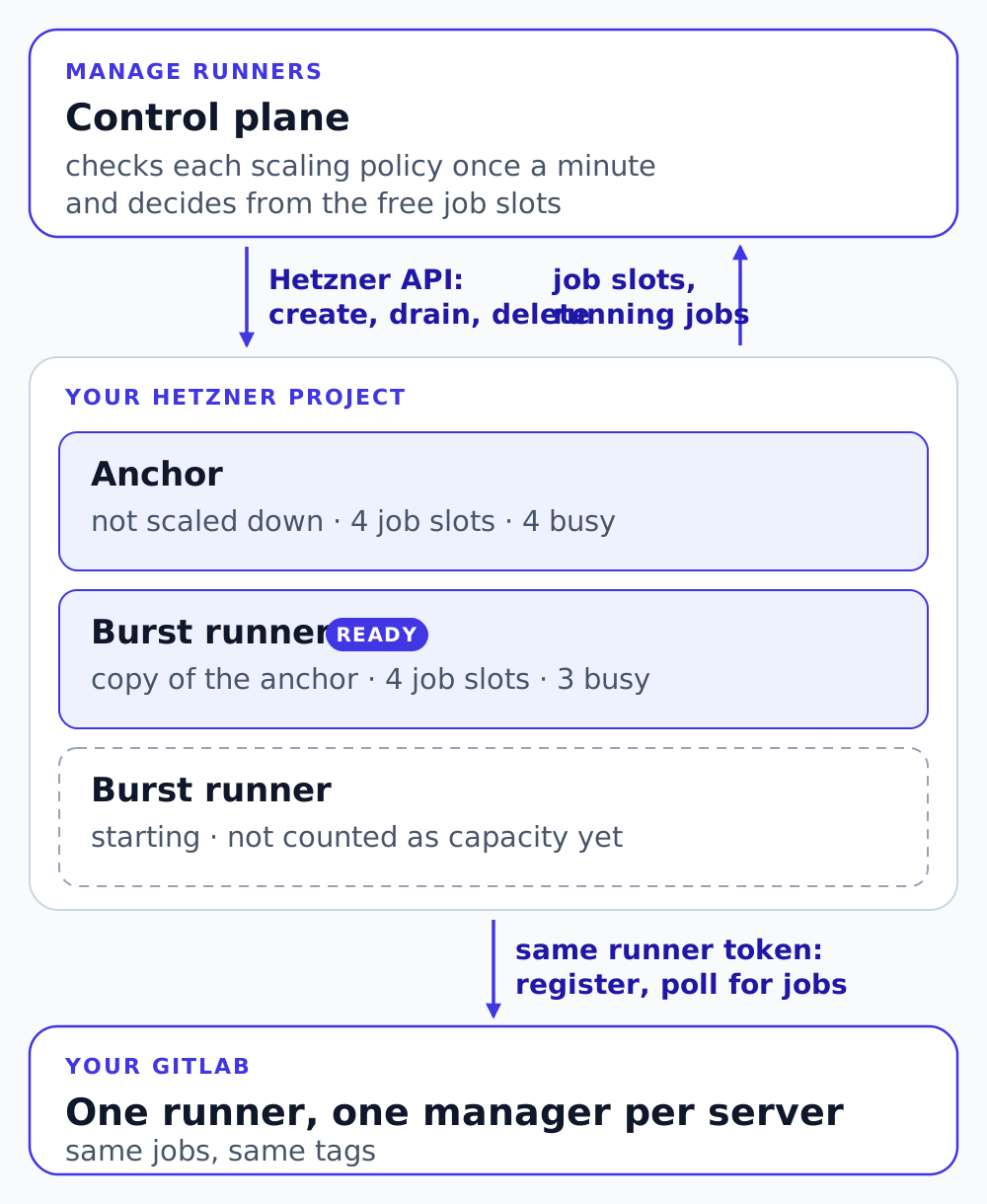
Autoscaling is set up per runner with a scaling policy. The runner that has the policy is the anchor: a runner that Manage Runners created, or an external runner such as your own dedicated server. Autoscaling adds capacity next to the anchor and never stops it, so there is no scale-to-zero.
The servers it adds are burst runners. For a Manage Runners anchor, each one is a copy of the anchor at the moment it is added: server type, location, Hetzner project, GitLab settings, concurrency, SSH keys, labels, cache and Metrics connection. Manage Runners didn’t set up an external anchor, so its policy describes the burst runners instead: server type, location, Hetzner token, GitLab instance and runner token, executor, concurrency and the rest. Saving the policy checks the SSH keys against the Hetzner project, and a new or changed runner token with GitLab. That catches invalid SSH key selections and rejected runner tokens before any server is provisioned.
A policy has a maximum of 1 to 20 burst runners, a step size of 1 to 5, and rules. Burst runners always have Monitoring on, because decisions depend on their reports. Otherwise they are ordinary runners, shown after their anchor with a Burst badge. You can delete one, but editing, pausing, resuming, duplicating or scheduling it is refused, so the policy and a person don’t fight over a server.
One GitLab runner, many machines
A burst runner is not a new runner in GitLab. It registers with the anchor’s runner authentication token. GitLab allows the same authentication token on several machines: each machine is a runner manager of that one runner, told apart by a system ID that GitLab Runner generates on the host. All managers of a runner get the same jobs, with the same tags, because those live on the runner in GitLab, not on the machine. Nothing changes in your .gitlab-ci.yml.
A removed server should leave GitLab tidy, too. When a burst runner becomes ready, Manage Runners records its server’s GitLab system ID. When the control plane deletes a server whose system ID it recorded, it requests deletion of exactly that runner manager with DELETE /api/v4/runners/managers, using the runner authentication token and the system ID. It’s the request GitLab Runner sends when you unregister one machine, which deletes only that manager, not the runner. The control plane does the same for any GitLab runner whose server it deletes, on a pause too. If GitLab can’t be reached, the manager stays until GitLab’s own stale runner manager cleanup removes it.
When an external anchor’s policy is first saved, or its GitLab host or runner token changes, the control plane calls POST /api/v4/runners/verify to check the runner token. GitLab requires a system ID for it, and the control plane then requests removal of the temporary manager the check registers.
Those two requests are all the control plane sends to GitLab, both with the runner authentication token, on endpoints that GitLab Runner itself uses. Manage Runners has no GitLab account or access token and doesn’t read your projects, pipelines or jobs. Jobs flow only between the servers and GitLab.
The signal: free job slots
A job slot is room for one CI job. A Manage Runners runner has as many as its concurrency, which is also GitLab Runner’s concurrent setting on the server. An external runner reports its limit.
The numbers come from the metrics collector that already runs on each server. Once a minute it reads the running jobs and the concurrent setting from GitLab Runner’s own metrics endpoint, which listens only on the server, and pushes them to Manage Runners with CPU and memory usage.
The group is the anchor plus its burst runners that are ready and reported within about three minutes. With a report from every member, its free job slots are:
free = (anchor slots + Σ slots of ready burst runners) − (running jobs of all of them)Rules evaluate the past minutes one at a time, as one-minute buckets. A bucket is anchored by an unused report less than 90 seconds old at the bucket’s end, a report is never reused for another bucket, and a member’s reports within one bucket are averaged. The group value for a minute uses the members with a known value for it; without the anchor’s value, that minute can’t satisfy a rule. A rule holds only when it holds in every minute of its duration, so a short spike doesn’t scale anything out.
Scaling out
The main rule has one number, K, and a duration: scale out when at most K job slots are free for M minutes. The presets are this rule with fixed values:
| Preset | Scale out when | For |
|---|---|---|
| Eager | at most 1 job slot is free | 2 minutes |
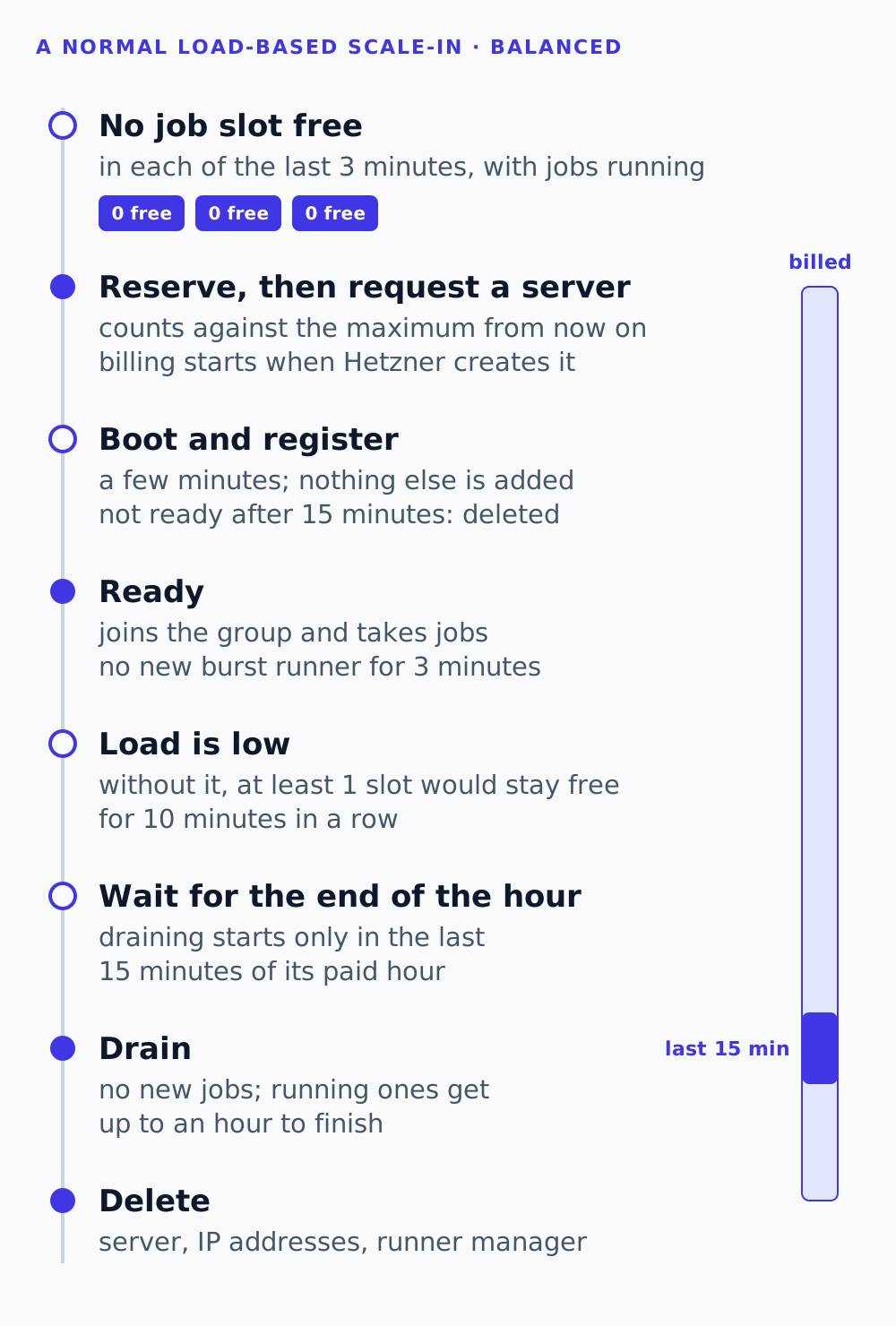
| Balanced (default) | no job slot is free | 3 minutes |
| Conservative | no job slot is free | 5 minutes |
Custom rules, up to three, one per metric, allow any K from 0 to 20, and CPU or memory with a scale-out and a lower scale-in threshold in percent. Scale-out needs any rule to hold.
Manage Runners checks every policy once a minute. Even when a rule holds, nothing is added while:
- the group is idle: the newest fresh report of the anchor and of each ready burst runner that has one says that no job is running;
- a burst runner is still starting;
- the newest burst runner became ready less than the wait after ready time ago (default 3 minutes), so the figures can catch up;
- the maximum is reached, counting every burst runner that exists, including starting and draining ones;
- the policy is waiting after a failure, or the organization’s plan doesn’t include autoscaling.
Idleness comes from each runner’s newest report, not from a minute’s average, which would still contain a job that just ended. A runner that reports no job count, for example an external runner without GitLab Runner’s metrics endpoint, makes the group not known to be idle, so CPU and memory rules still work there.
A scale-out adds the step size, never more than the maximum allows. With the presets, a burst runner is requested 2 to 5 minutes after the slots fill up, plus up to a minute until the next check, and then needs a few minutes to boot and register. One that isn’t ready within 15 minutes is deleted and counts as a failure.
Scaling in
Scale-in asks a different question about the same K: would more than K job slots still be free without one burst runner, for the whole remove after low load window (default 10 minutes)? The jobs of that runner count as if they had moved to the others.
Take an anchor with 4 slots on Balanced (K = 0). Its four slots were full for three minutes, so one four-slot burst runner was added. Later, three jobs run across the eight slots. Without the burst runner, 4 − 3 = 1 slot would be free, which is more than 0. Once that has held for 10 minutes, the burst runner can go.
Asking two questions about the same K keeps the number of burst runners from swinging back and forth: added at K or fewer free, removed only when more than K would stay free without it. After a removal, the group is still above the line where runners are added. CPU and memory rules get the same effect from their two thresholds, and while scale-out needs any rule, scale-in needs every rule to allow it.
Load-based scale-in requires the selected runner’s metric values throughout the window, and every configured rule must allow removal. If a rule fails on the known values, the runner stays.
One case needed a second look before release. A free job slots rule whose K is at least the job slots the group keeps can never see “more than K free” without a runner: with K = 1 on a 1-slot anchor, removing the last burst runner leaves at most 1 free slot, which is never more than 1. The last burst runner would stay forever, idle. So a free job slots rule also allows scale-in when the group ran no job for the whole window. That needs a known zero from every runner in every minute: a missing report or an unknown count proves nothing. It can’t undo itself either, since nothing is added while the group is idle.
Removing a runner when its hour is paid for
Hetzner bills a server for every hour it has started, from its creation. Removing a burst runner five minutes into an hour throws away 55 paid minutes that the next busy spell might need.
So for load-based scale-in, Manage Runners starts draining at most one ready burst runner per check, and only during the last 15 minutes of its current paid hour, counted from the time Hetzner created its server, not from when Manage Runners requested it. When several qualify, the one closest to the end of its hour goes first; on a tie, the one with fewer running jobs. Deletion follows the drain. Failure cleanup and explicit stops, such as disabling the policy, don’t wait for that window.
The dashboard counts a burst runner’s running time from the same moment, for example Running for 1 h 12 min · since 14:02, so it matches what Hetzner bills. And the explanation next to remove after low load warns that a burst runner can stay up longer than that, because it also waits for the end of its hour.
Giving running jobs time to finish
During load-based scale-in, Manage Runners starts a graceful drain instead of deleting the server right away, the same path as Pause after running jobs. The control plane asks Hetzner for an ACPI shutdown once the server is running. On the server, systemd stops GitLab Runner with SIGQUIT, which is GitLab Runner’s graceful shutdown signal: it stops accepting new jobs and exits as soon as the running ones finish. systemd’s defaults would cut that short, so the servers carry drop-ins like these:
# gitlab-runner.service
[Service]
KillSignal=SIGQUIT
KillMode=mixed
TimeoutStopSec=1h

# poweroff.target
[Unit]
JobTimeoutSec=70min
The stop timeout gives jobs up to an hour, and the power-off timeout is raised above it, because systemd would otherwise force the power-off after 30 minutes. Job containers run in a slice that the shutdown doesn’t stop early, so they keep running until GitLab Runner, which waits for them, has stopped.
Once Hetzner reports the server off, or the one-hour drain deadline passes, Manage Runners requests its deletion. Jobs still running at the deadline can be interrupted. Unlike a paused runner, a burst runner has no next resume, so Manage Runners also deletes its primary IP addresses and requests removal of its runner manager in GitLab. Draining can run past the end of the paid hour, and Hetzner then bills another one: the cost of giving jobs time to finish.
Keeping the number of servers bounded
Every scale-out creates servers in your Hetzner project. Most of the engineering went into keeping their number where you set it, and keeping track of each one.
Reserve before provisioning. A burst runner is recorded as a reservation of its anchor in the transaction that stores the runner, before Manage Runners asks Hetzner for a server. That transaction locks the policy and checks again what the decision was based on:
in one transaction, holding the policy's lock:
    the policy is the version the decision was made on, and enabled
    the anchor is still active
    burst runners of this anchor < maximum
    store the runner and its reservation
then, outside the transaction:
    ask Hetzner for the server
Changing, disabling or deleting a policy takes the same lock, so a check running while you lower the maximum can’t add one too many. The maximum caps how many burst servers exist at once: a burst runner counts from its reservation until its server is deleted, also while it starts, drains or waits for a blocked cleanup.
Failures back off, then stop. A burst runner that can’t be created, isn’t ready within 15 minutes or fails to register is deleted and counts as a failure. After the first, Manage Runners waits 5 minutes before adding runners, after the second 10. The third in a row disables the policy, drains its burst runners, shows the reason on the card and emails the organization’s owners and editors. A burst runner that becomes ready resets the count.
Keeping track of uncertain servers. The autoscaler keeps the cleanup of an uncertain burst runner pending rather than dropping it, since its server could still be running. Manage Runners labels every server it creates with the Hetzner label managerunners-runner and the runner’s ID, and attempts to label its primary IP addresses too. When a creation was interrupted or a state is unknown, Manage Runners looks for the server by its ID or that label and deletes it through the usual path. Only the token the runner was created with can prove that a server is gone: a token of another project finds nothing, and “found nothing” proves nothing. If Hetzner refuses that token, the anchor’s or the policy’s current token is used only when it finds the runner’s labelled resources itself. If the cleanup can’t finish, the card says why, and the runner keeps counting against the maximum.
Turning it off. Disabling or deleting the policy, deleting the anchor, or pausing a Manage Runners anchor, by hand or by its schedule, starts the removal of every burst runner. Disabling and deleting need no plan, since they only remove servers.
Seeing what it does
Every check records its decision and reason; the runner’s card shows the last one with the group’s capacity, for example 3 of 8 job slots busy · 5 free. The autoscaling page explains the setting for the current slots (With 4 job slots now: a burst runner starts when all 4 are busy for 3 minutes) and keeps an event log in sentences built from the rule that fired:
Added burst runner build 2: no job slot was free for 3 minutes
Draining burst runner build 2: without this runner, at least 1 job slot would have been free for the last 10 minutes
Burst runner build 2 was deleted
When nothing happens, the reason says why, for example that a burst runner is starting or the maximum is reached. Each is logged once when it changes, not every minute.
Policies are also in the CLI, for example manage-runners runner autoscaling set --name build --preset balanced --max 3 --yes, where --yes skips the confirmation prompt, and in the MCP server for AI assistants. The MCP tools never take tokens: when an external runner’s policy needs them, the assistant hands you a dashboard link to enter them yourself.
The trade-offs
This design makes choices you will notice:
- Minutes, not seconds. Reports arrive once a minute, a rule must hold for its duration, and a new server takes a few minutes to boot. Autoscaling absorbs busy periods; it doesn’t make one pipeline start faster.
- No queue signal. Manage Runners sees busy job slots, not jobs waiting in GitLab.
- No scale-to-zero. Autoscaling leaves the anchor running; it supplies the signal.
- Whole servers, by the hour. A burst runner is a full server, billed by the started hour, and load-based removal starts only near the end of a paid hour. Its jobs share it, as on the anchor.
GitLab Runner has its own autoscaling, the Docker Autoscaler and Instance executors, successors to the deprecated Docker Machine executor. There, a runner manager that you run creates instances on demand through fleeting plugins for cloud instance groups, with GitLab-maintained plugins for AWS, Google Cloud and Azure, configured in config.toml with settings such as capacity_per_instance, max_use_count and idle policies. Because that runner manager processes the jobs itself, it can size capacity to the volume of jobs, and an instance can serve a single job before it is replaced.
Manage Runners takes another route. The long-lived component that decides is its control plane, not a process on your infrastructure, and each burst runner is a complete GitLab Runner server registered as one more runner manager. There is no autoscaler configuration on the anchor, it works next to an existing external runner, and every burst runner is an ordinary runner you can see and delete. In exchange, it reacts in minutes and scales in whole servers.
The autoscaling manual has every setting and limit, and the CLI reference the runner autoscaling commands. Autoscaling is part of the Pro and Enterprise plans; Autoscale for peaks in the cost calculator estimates what it adds.