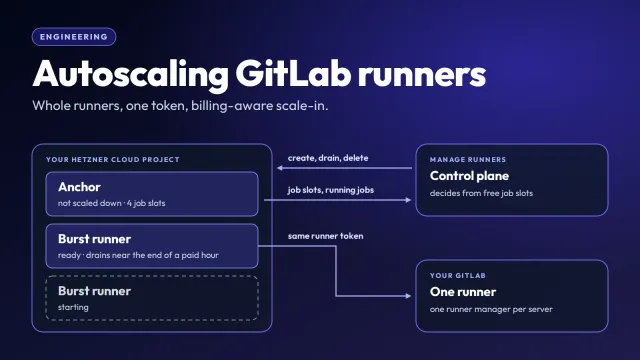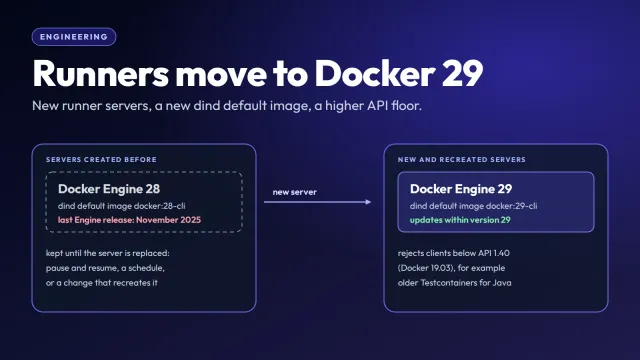
We run our own self-hosted GitLab with about 30 projects, and Renovate keeps their dependencies up to date. Since this week, Renovate does all of its work in an eight-hour window at night, as fast as it can. That turns our CI load at night into bursts, and one runner can’t keep up with them. Manage Runners adds burst runners next to it while its job slots are full.
This post is a case study of the first two nights: what the load looked like, what autoscaling did with it, the two settings we changed after the first night, and what is left. All times are local (UTC+7). How burst runners work is in How autoscaling works for GitLab runners on Hetzner; here, only the parts the story needs.
Why Renovate only works at night
Renovate may create, rebase and merge merge requests only at night, so developers don’t get churn while they work: no branches rebased under them, no merges landing in the middle of the day, no surprise conflicts and no notification noise. During the day, the repositories belong to the people working in them.
One Renovate job serves every project: self-hosted, a scheduled pipeline in GitLab that discovers the repositories on its own. Minor, patch, digest and pin updates are merged automatically once their CI is green; npm updates wait three days, as a supply-chain cutoff. The shared default config sets the schedule:
{
  "schedule": ["* 22-23,0-5 * * *"]
}
The Renovate runner forces the automerge window and three related settings, so no repository can merge outside the window:
{
  "timezone": "Asia/Ho_Chi_Minh",
  "automergeSchedule": ["* 22-23,0-5 * * *"],
  "updateNotScheduled": false,
  "platformAutomerge": false
}
A repository could override schedule and open or update branches on its own timetable; none of ours do.
platformAutomerge: false matters here. With it on, Renovate would hand the merge to GitLab (“merge when the pipeline succeeds”), and GitLab would merge whenever a pipeline finished, at any hour. With it off, only Renovate merges, and only while it runs inside the window. updateNotScheduled: false keeps Renovate from updating existing branches outside it, too. The window was 23:00 to 06:00; on 23 October we widened it to 22:00 to 06:00.
The trade-off is that everything else waits for the night as well: ticking a box in the Dependency Dashboard, asking for a manual rebase, onboarding a new repository.
One merge per repository per run
A night window would be fine if Renovate could merge everything in one go. It can’t. It merges roughly one update per repository per run (per target branch, strictly):
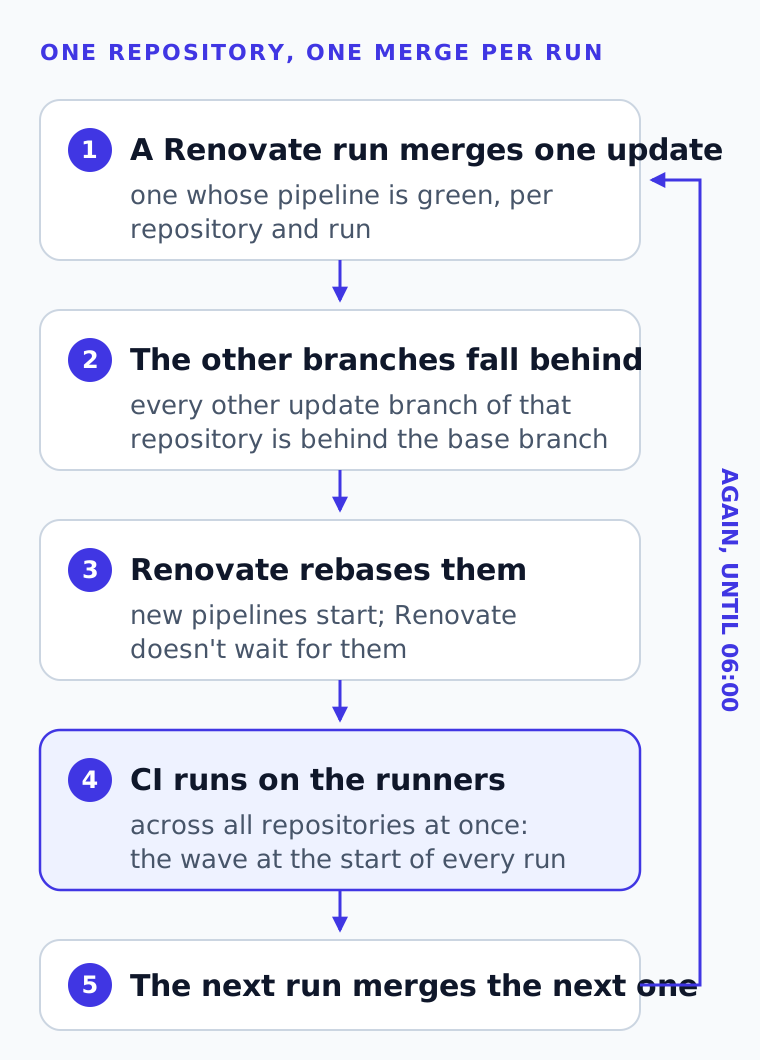
Merging one merge request puts the repository’s other automerge branches behind the base branch. Renovate rebases them, which starts new pipelines, and doesn’t wait for them. Only a later run can merge the next update, once its pipeline is green. One run at 05:03 on 23 October shows it: it merged 3 updates, created 10 merge requests, rebased 14 branches that had fallen behind and left 5 waiting for CI.
So merges per night depend on how many runs fit into the window. Before, Renovate ran once an hour around the clock. Runs outside the window did no updates and took about 8 minutes of scanning; runs inside it took 17 to 25 minutes, sometimes up to 42. That made 7 runs inside the window.
On 23 October we replaced that with a pipeline schedule that fires only at night:
*/15 22,23,0-5 * * * # Asia/Ho_Chi_MinhGitLab fires schedules on its scheduler’s own ticks, so the runs were triggered at :03, :23, :33 and :53. They are serialized through a GitLab resource group, and a run takes 17 to 30 minutes, so they queue up and run back to back all night. The ones still queued at 06:00 start, find themselves outside the window, and do nothing. Some queued runs get cancelled by GitLab’s auto-cancel of redundant pipelines whenever Renovate merges an update into its own config repository. That’s harmless.
What that does to the runners
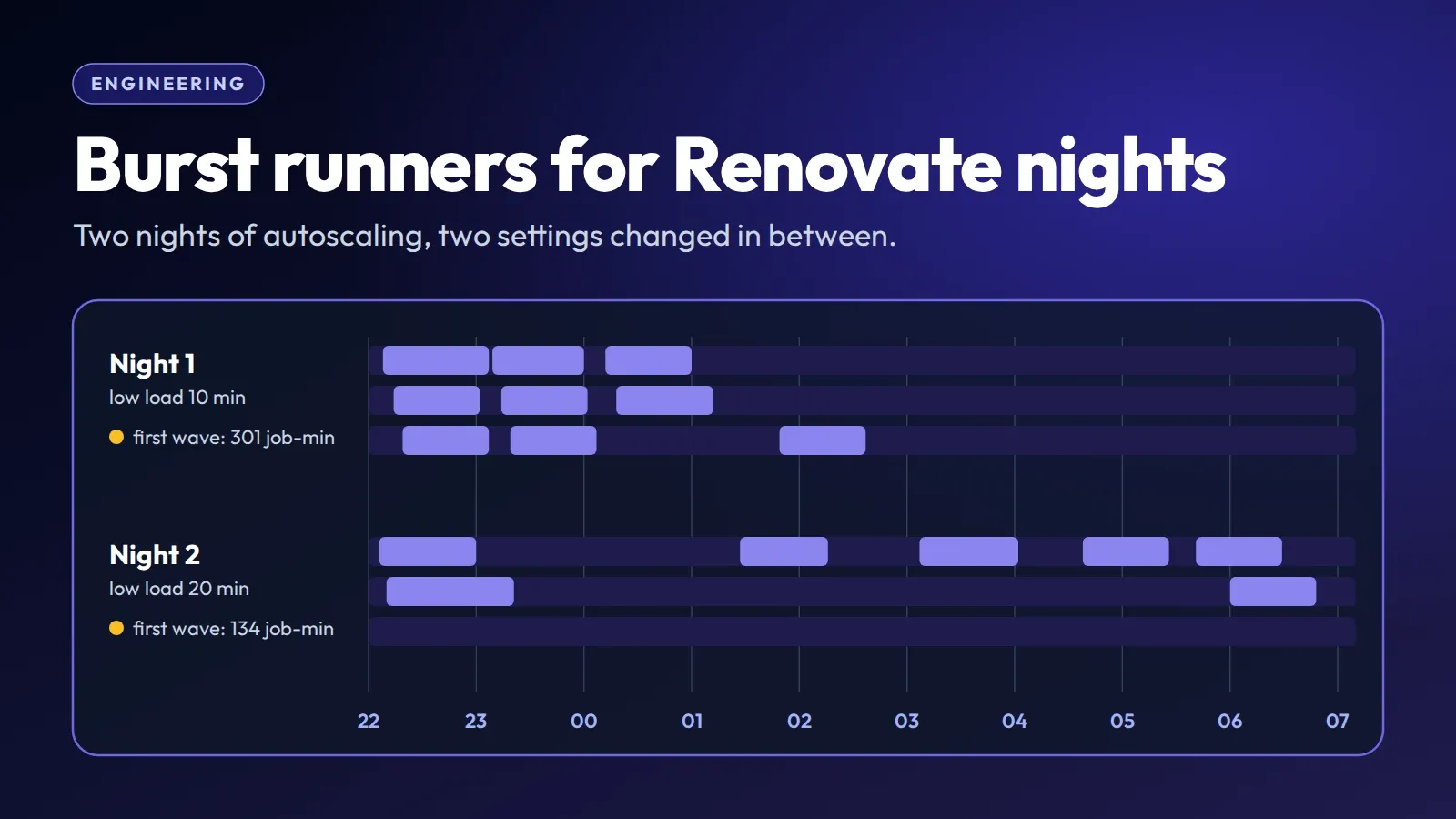
Each run rebases branches and creates merge requests, and each of those starts a pipeline. The CI load arrives in waves at the start of each Renovate run, about 20 to 30 minutes apart, with quiet gaps of 10 to 15 minutes between them.
All Docker-executor jobs of the GitLab, everything tagged docker, run on one runner: our own machine with 8 cores, 16 threads and 64 GB of RAM, with a GitLab job limit of 12. It’s registered in Manage Runners as an external runner with the monitoring agent, which makes it an anchor that autoscaling can add burst runners to.
On 23 October, the same day as the schedule change, we gave it a scaling policy:
- When to scale: Eager. A burst runner is added when at most 1 of the group’s job slots is free for 2 minutes; on the anchor alone, when 11 of its 12 job slots are busy.
- Runners added per step: 1, maximum burst runners: 3.
- Burst runners: Hetzner cpx42 (8 vCPU, 16 GB) in Falkenstein, 3 concurrent jobs each, registered with the anchor’s runner token. Each one is a whole server and another runner manager of the same GitLab runner, so it gets the same jobs.
Scale-in is billing-aware: Manage Runners drains a burst runner only in the last 15 minutes of its paid Hetzner hour, and only when, without it, more than 1 job slot would have been free for the whole remove after low load window. Draining lets running jobs finish first.
Night 1: it worked, then it bought the same capacity again
On the first night, 23 to 24 October, Renovate was triggered 32 times; 30 runs ran, back to back from 22:03 to 06:43, and 2 were auto-cancelled. 25 of them started inside the window: the first three took 31, 29 and 25 minutes, the remaining in-window runs 17 to 21. The 5 that started after 06:00 did no work. They merged 26 updates and created 15 merge requests. 22 of the merges came in the first three runs (5, 12 and 5), the last one at about 01:50. From then on, every run only re-checked the same 8 or 9 merge requests whose CI was failing or never went green.
The runners got 642 Docker jobs that night, with a median duration of 84 seconds, and up to 21 at once: 12 on the anchor plus 3 on each of three burst runners.
Two settings mattered: remove after low load was 10 minutes, and wait after ready, the pause after a burst runner becomes ready before another is added, was 3 minutes.
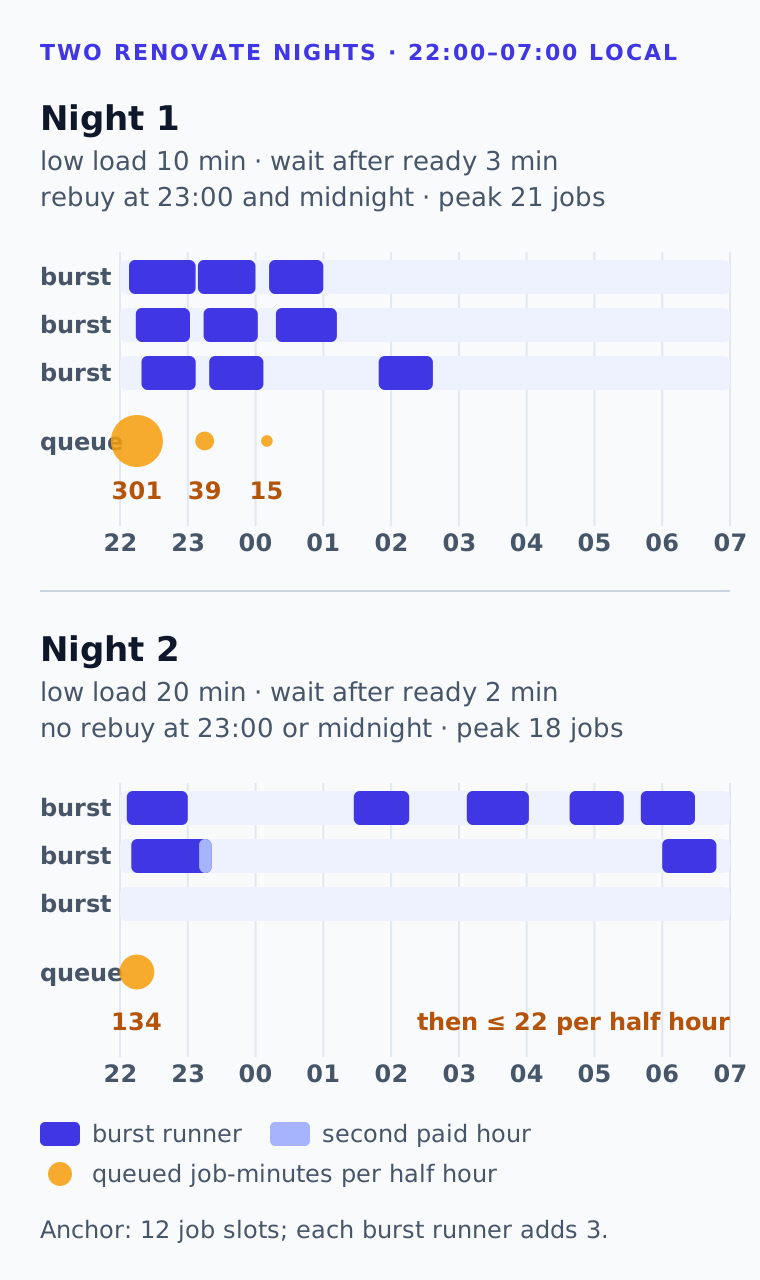
The first wave queued. It arrived before any burst runner was up, and they came one at a time, at 22:08, 22:14 and 22:19. Between 22:00 and 22:30, jobs spent 301 job-minutes in the queue; 44 jobs waited longer than a minute, the longest 15 minutes. Autoscaling reacts in minutes, from a full group: 2 minutes of Eager’s rule, up to a minute until the next check, a few minutes of booting, and the wait after ready before the next one.
Then it bought the same capacity again. The end of the three burst runners’ first paid hour fell into a quiet gap. A 10-minute low-load window fits into a 10 to 15 minute gap, so all three drained between 22:57 and 23:04 and were deleted by 23:07. Then the next wave arrived, and new burst runners were added at 23:09, 23:14 and 23:19: new paid hours, cold Docker caches, and 39 queued job-minutes in the meantime. Around midnight the same happened again, with new burst runners at 00:12 and 00:18 and 15 queued job-minutes. A late burst runner, 01:49 to 02:37, held a paid hour for about 10 minutes of overflow.
Every one of those decisions was correct by the rules: the load was low for 10 minutes. The rules just didn’t know that the load comes back every 20 to 30 minutes.
The night used about 9 paid cpx42-hours: about a dollar at list price.
Two settings, changed from what we saw
On 24 October we changed two settings and left everything else alone, including step size and the Eager trigger:
| Setting | Night 1 | Night 2 | Why |
|---|---|---|---|
| Remove after low load | 10 min | 20 min | longer than the quiet gaps between waves, so a burst runner survives a gap and is still there for the next wave |
| Wait after ready | 3 min | 2 min | the next burst runner can follow sooner while the first wave is still queuing |
The 20 minutes come straight from the waves: they are 20 to 30 minutes apart, and the gaps between them last 10 to 15 minutes. A burst runner should now see load again before its low-load window has run out, so the end of its paid hour no longer decides when it goes.
Night 2: shorter queues, fewer burst runners
On the second night, 24 to 25 October, Renovate was triggered 32 times again; 26 runs ran and 6 were auto-cancelled. 25 started inside the window and took 17 to 29 minutes; the last queued run started after 06:00, did no work and finished at 06:16. They merged 29 updates and created 29 merge requests: 12 merges in the run at 22:30, then 1 to 4 per run between 01:05 and 05:00, as new releases came out and their merge requests passed CI within one or two runs. 8 merge requests stayed blocked by failing or never-green CI.
The runners got 658 Docker jobs, with a peak of 18 at once at 22:12.
The first wave queued less. The first burst runner was added at 22:06 and the second at 22:10. Between 22:00 and 22:30, jobs spent 134 job-minutes in the queue; 24 waited longer than a minute, the longest 8 minutes.
No rebuy at 23:00 or midnight. There were no queues around 23:00 or 00:10. To be fair to the numbers, night 2 also had less load in that period, so this is only partly the longer window’s doing. For the rest of the night, queues stayed at 22 job-minutes per half hour or less, and the longest wait was 2.1 minutes, in the wave at 05:30.
Burst runners ran 22:06–23:00, 22:10–23:21, 01:27–02:16, 03:07–04:02, 04:38–05:26, 05:41–06:29 and 06:00–06:48, never more than 2 at once. There was one quick rebuy: deleted at 05:26, added again at 05:41. And one drain took 18 minutes, because its last job ran long, so the burst runner from 22:10 crossed into a second paid hour. That’s the price of letting jobs finish instead of killing them.
The night used about 8 paid cpx42-hours, again about a dollar at list price.
| Before (hourly runs, 23:00–06:00) | Night 1 | Night 2 | |
|---|---|---|---|
| Renovate runs started in the window | 7 | 25 | 25 |
| Updates merged | not measured per night; 3 in the one run we sampled | 26 | 29 |
| Queue in the first wave | n/a | 301 job-min, longest 15 min | 134 job-min, longest 8 min |
| Burst runners | none | ≈ 9 paid cpx42-hours, about $1 | ≈ 8 paid cpx42-hours, about $1 |
The “before” column has no per-night merge count: our Renovate logs expire after a day, and the window was an hour shorter then.
What limits us now
Not runner capacity. After the first wave, queues stay short, and Renovate’s runs spend their time re-checking the same handful of merge requests whose pipelines fail or never finish green: 8 or 9 on the first night, 8 on the second. More Renovate runs or more runners don’t move them; someone has to fix those pipelines.
Two more settings could still help the first wave. We haven’t tried either:
- Step size 2, to add two burst runners at once. The second one already comes about 4 minutes after the first, so the gain would be small.
- 4 jobs per cpx42 instead of 3, for more job slots per paid hour. We’d check the burst runners’ memory first.
What we’d tell you to look at
If your load comes in waves, as ours does, look at the gaps between them before you choose remove after low load. A window shorter than the gaps lets a burst runner go whenever the end of its paid hour falls into a gap; the next wave then pays for a new hour and starts with cold caches. A window longer than the gaps keeps them across the gaps, so they go when the load really drops.
The first wave of a busy period will still queue: autoscaling sees full job slots, not jobs waiting in GitLab, and a new server takes a few minutes. For us, that’s up to 8 minutes of queue at 22:00 on pipelines nobody is waiting for, against two nights of burst runners for about a dollar each.
The autoscaling manual has every setting, and How autoscaling works explains the scale-out and scale-in rules this story depends on.