In modern delivery pipelines, executing integration tests that emulate user interfaces is notoriously resource-intensive. Teams leveraging tools like Cypress, Playwright, or Selenium alongside virtual framebuffers (Xvfb) frequently watch their pipeline runtimes climb due to unmanaged memory spikes. When scaling automated testing frameworks, a poorly optimized headless browser instance can quietly gorge on RAM, leading to sudden Out-Of-Memory (OOM) crashes and stalled runner nodes. Taming this resource consumption requires a deep look at browser process lifecycles and garbage collection mechanisms within interface-less environments.
1. The Invisible Drain of Virtual Display Pools
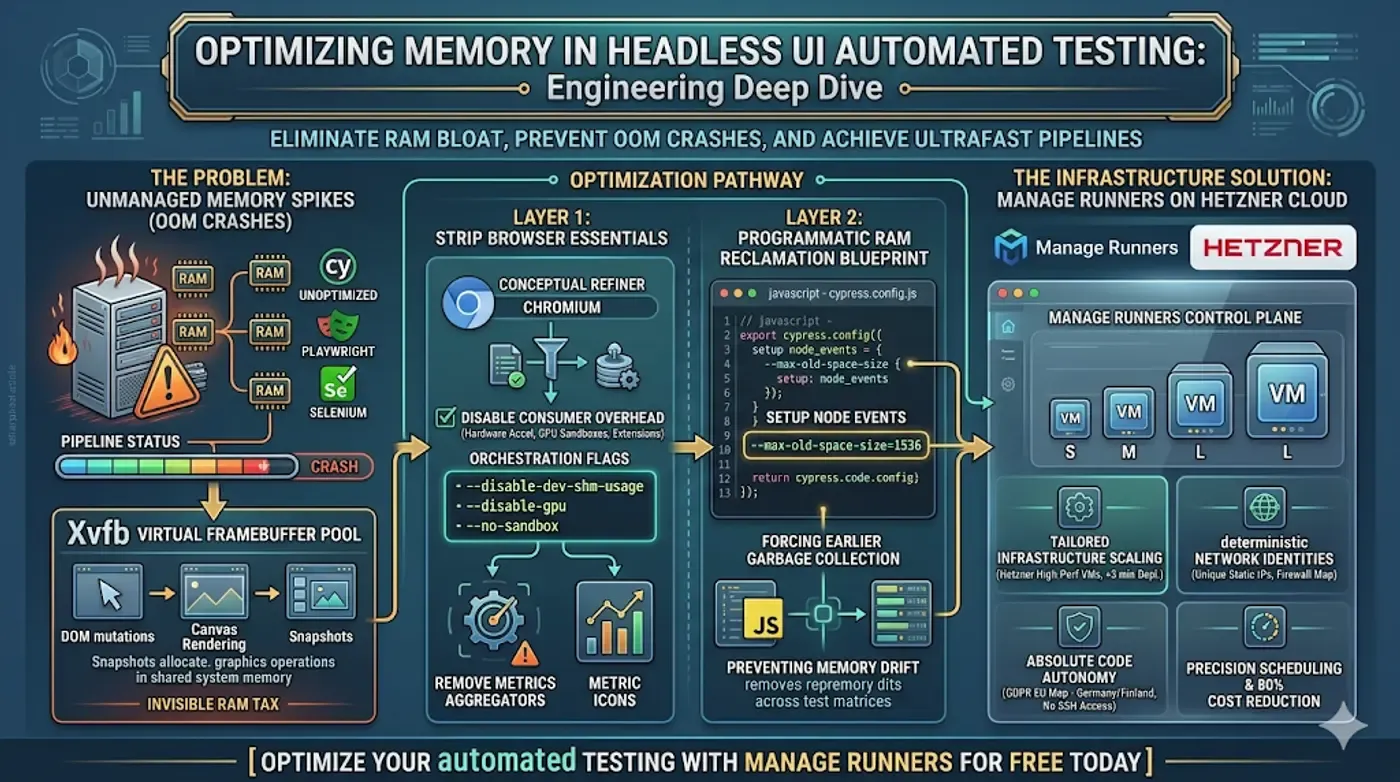
To run UI-driven tests on a headless server, the system must simulate a graphical environment. Xvfb (X Virtual Framebuffer) achieves this by performing all graphical operations directly in system memory without displaying an actual visual output.
While this allows full browser engines to run on a standard CLI host, it creates a unique memory trap. Every single DOM mutation, canvas rendering, or simulated snapshot allocates shared memory inside Xvfb's virtual display server. Unlike a normal computer where the GPU handles display memory, headless servers pool all display buffers into host system RAM, accelerating memory starvation if long test suites run continuously on a single worker node.
2. Stripping the Browser Down to Raw Essentials
By default, standard browser processes launch background utilities designed for a consumer desktop environment: hardware acceleration protocols, metric aggregators, GPU sandboxes, and extension handlers. In an automated testing context, these features are useless overhead.
To maximize system throughput, you must pass specific orchestration flags to the binary. Disabling the shared memory flag (--disable-dev-shm-usage) forces the browser to utilize the standard user disk partition rather than /dev/shm, which is often restricted to a default size of 64MB inside dockerized environments and acts as an immediate trigger for browser crashes.
3. Programmatic RAM Reclamation Blueprint
To prevent your runner nodes from hitting an infrastructure wall during prolonged testing cycles, you must enforce explicit memory allocation limits and force the underlying execution engine to recycle its workspace memory.
Below is an optimization blueprint for tuning a Chromium-based testing suite to run within strict boundary conditions:
// cypress.config.js - Advanced Memory Tuning for Headless Testing
const { defineConfig } = require('cypress');

module.exports = defineConfig({
  e2e: {
    setupNodeEvents(on, config) {
      on('before:browser:launch', (browser = {}, launchOptions) => {
        if (browser.family === 'chromium' && browser.name !== 'electron') {
          // Maximize RAM reclamation in headless mode
          launchOptions.args.push('--disable-dev-shm-usage');
          launchOptions.args.push('--disable-gpu');
          launchOptions.args.push('--no-sandbox');
          // Restrict V8 heap allocation to force earlier garbage collection
          launchOptions.args.push('--js-flags=--max-old-space-size=1536');
        }
        return launchOptions;
      });
    },
  },
});
Limiting the V8 engine heap size via JavaScript flags forces memory recycling to execute earlier in the pipeline lifecycle, preventing progressive memory drift across broad test matrices.
4. Manage Runners: High-Memory Isolation on Hetzner Cloud
Optimizing software flags yields diminishing returns if your build pipelines run on constrained, multi-tenant cloud architectures. Manage Runners provides an elegant, automated control plane designed to deploy and scale high-performance GitLab runners directly on Hetzner Cloud.
Our platform removes the infrastructure complexity of running resource-heavy frontend workloads:
- Tailored Infrastructure Scaling: Instantly spin up dedicated runner virtual machines on Hetzner’s high-performance hardware lines in under 3 minutes via a clean, unified dashboard.
- 1-Click Scaling & Parity: Effortlessly clone your optimized runner execution specifications to ensure identical, predictable build environments across your entire engineering team.
- Deterministic Network Identities: Every automated runner receives a unique Static IP address, giving your security team a clean network anchor to securely restrict deployment destinations.
- Absolute Code Autonomy: Built to be fully GDPR compliant, all runner VMs host safely inside your own EU-based Hetzner account (Germany/Finland). Crucially, Manage Runners maintains no SSH access to your runner instances, keeping your code private.
By utilizing our native precision scheduling to automatically sleep runners during idle off-hours and paying Hetzner directly for raw compute with zero provider markup, engineering teams routinely reduce standard managed CI/CD infrastructure spend by up to 80% while keeping intensive test loops fully unthrottled.
5. Conclusion
Interface-less browser testing shouldn't feel like an infrastructure guessing game. By pairing clean process containment flags with the high-performance, automated resource control provided by Manage Runners, you dismantle the memory bottleneck and pave a clean path toward reliable continuous integration.
Ready to unlock unthrottled test performance? [Optimize your Automated Testing with Manage Runners] and experience automated runner management on Hetzner Cloud.